
Live Dealer Table Flow Explained: Betting Windows, Results and Connection Checks
A practical explanation of how live dealer tables move from entry and betting to result confirmation and round history.
Introduction
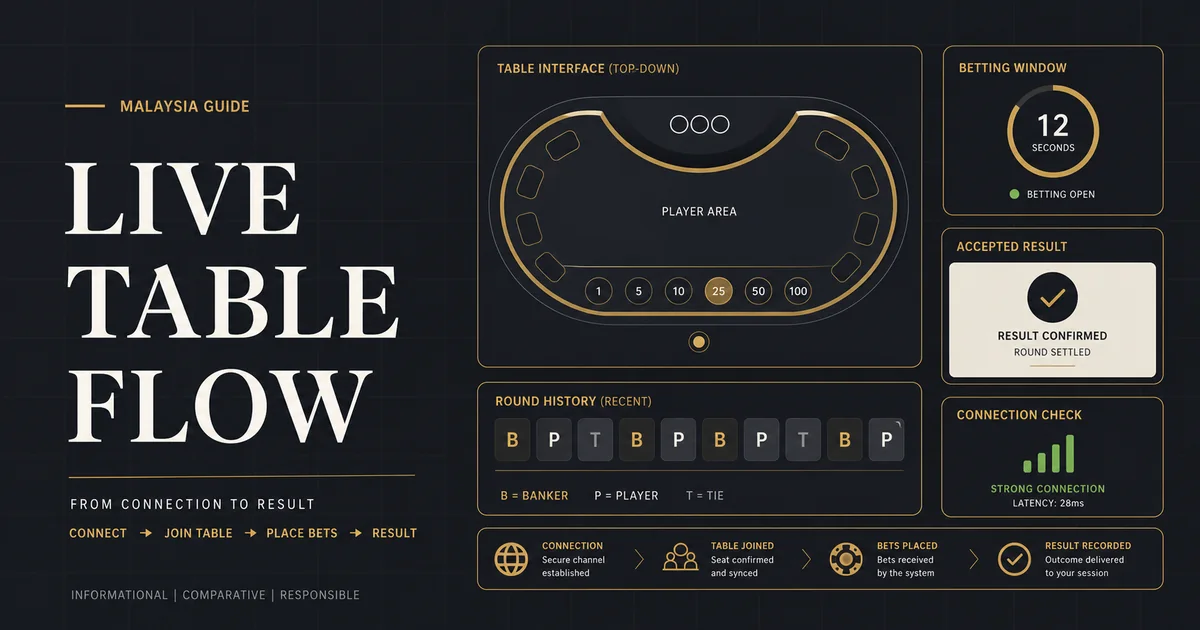
Live dealer casino games generally follow a repeating sequence: a user enters a table, reviews its limits and rules, places an action while the betting window is open, waits while the round is conducted, and then checks the confirmed result and account history. The video stream supports the experience, but the interface and recorded result are what users should rely on for acceptance and settlement.
This guide explains the operational flow rather than predicting outcomes or comparing individual tables. It supports the Live Casino category page by answering beginner questions about timing, side bets, connection interruptions and records. A separate Winbox live casino information link is included as a contextual brand reference.
Quick Answer
- Check table rules and limits before joining a round.
- Place actions only while the visible betting window is open.
- Wait for an accepted-bet or ticket confirmation.
- Treat the stream as a view of the event, not the only transaction record.
- If the connection drops, check history before repeating an action.
- Avoid side bets until their separate rules and costs are clear.
Before the Round Begins
The lobby normally shows table name, game variant, minimum and maximum stake, occupancy and sometimes recent results. Recent-result displays are historical; they do not prove what will happen next. Choose a table because its rules, pace and limits fit your plan, not because a pattern appears on the screen.
After entry, locate the rules, main action controls, chip or stake selector, timer, balance display and history. Some tables open in the middle of a round. Wait until the interface clearly invites the next action.
Table variants matter
A familiar name does not guarantee identical side bets, drawing rules, commission, payout rules or action windows. Read the exact table information rather than importing assumptions from another table.
The Betting Window
The betting window is the period in which the system accepts an action for the upcoming round. A countdown can help with timing, but network latency means users should not wait for the final moment. Once the window closes, buttons may lock and new actions should apply only to a later round.
An on-screen chip movement is not always enough to prove acceptance. Look for a confirmed state, ticket or history entry. If the interface offers repeat or double controls, verify the resulting total before selecting them.
Main bets and side bets
Side bets are separate decisions with their own probabilities, payouts and limits. They can increase the total amount committed to a round. Read their paytable and do not assume they are included in the main action.
Dealer Action and Result Confirmation
During the live action, the stream may show cards, wheels, dice or another event. Interface overlays usually identify the current stage and final outcome. The confirmed system result and round identifier matter if the visual feed pauses or arrives late.
After settlement, compare the result display with balance movement and history. A result animation can finish before the record updates. Allow the interface to complete rather than refreshing repeatedly.
Connection Problems and Interrupted Rounds
A weak connection can freeze video while the underlying round continues. First check whether controls remain responsive and whether the round identifier changes. Avoid placing the same action again until history shows whether the original was accepted.
If the page reconnects, review the last completed round and transaction record. Capture the round number and time if a discrepancy remains, then use verified support without sharing passwords or one-time codes. More protective steps are available in the account security checklist.
Mobile Live Casino Checks
On mobile, rotate only if the interface supports it and keep essential controls visible. Disable accidental screen locking during a short session, use a stable connection and confirm that the timer, stake total and history can be read without zooming.
A smaller display can hide secondary controls or rule links. Review rules before the table becomes time-sensitive. The broader games guide explains how live tables differ from slots and other categories.
Practical Reference Table
| Round stage | What to observe | User check |
|---|---|---|
| Table entry | Variant, limits, rules and status | Confirm the table fits the intended stake |
| Betting open | Timer and active controls | Review the total before submission |
| Betting closed | Controls lock for the round | Do not attempt a late duplicate action |
| Live action | Stream plus round identifier | Use the interface state if video lags |
| Result | Outcome, balance and history | Confirm settlement in the recorded history |
Step-by-Step Checklist
-
Read the table card
Check variant, limits and status before entry.
-
Open the rules
Review main action, side bets and settlement conditions.
-
Watch one round
Learn the pace before committing an amount.
-
Act before the final seconds
Allow time for network transmission and confirmation.
-
Verify acceptance
Use the interface confirmation or history record.
-
Review the completed result
Match the round outcome, balance and history before the next action.
Frequently Asked Questions
What is a live dealer game?
It is a remotely streamed table experience in which an interface lets users make stated actions during timed rounds conducted by a dealer or live game system.
What happens when the betting timer reaches zero?
The current round stops accepting new actions. Controls normally lock until the next betting window opens.
Can a video delay change the recorded result?
The stream can lag without changing the system’s recorded round. Use the round identifier and account history when checking acceptance and settlement.
What should I do after a disconnect?
Reconnect, inspect the last round and transaction history, and avoid repeating an action until its status is clear.
Are side bets part of the main bet?
Usually they are separate, with their own cost and paytable. Confirm the total shown by the interface.
Do recent results predict the next live round?
No. A history display reports previous rounds and should not be treated as a reliable forecast.
Conclusion
A live table is easiest to understand as a timed workflow: inspect, act, confirm, observe and verify. Knowing where the official round record appears is especially important when a stream or mobile connection is interrupted.
Continue Your Research
Use the site’s focused landing page and related guides to verify current information before making a decision.