
How to Spot Fake Casino Login Pages and Support Messages
A practical security guide for checking domains, login forms, urgent messages and support requests before sharing account information.
Introduction
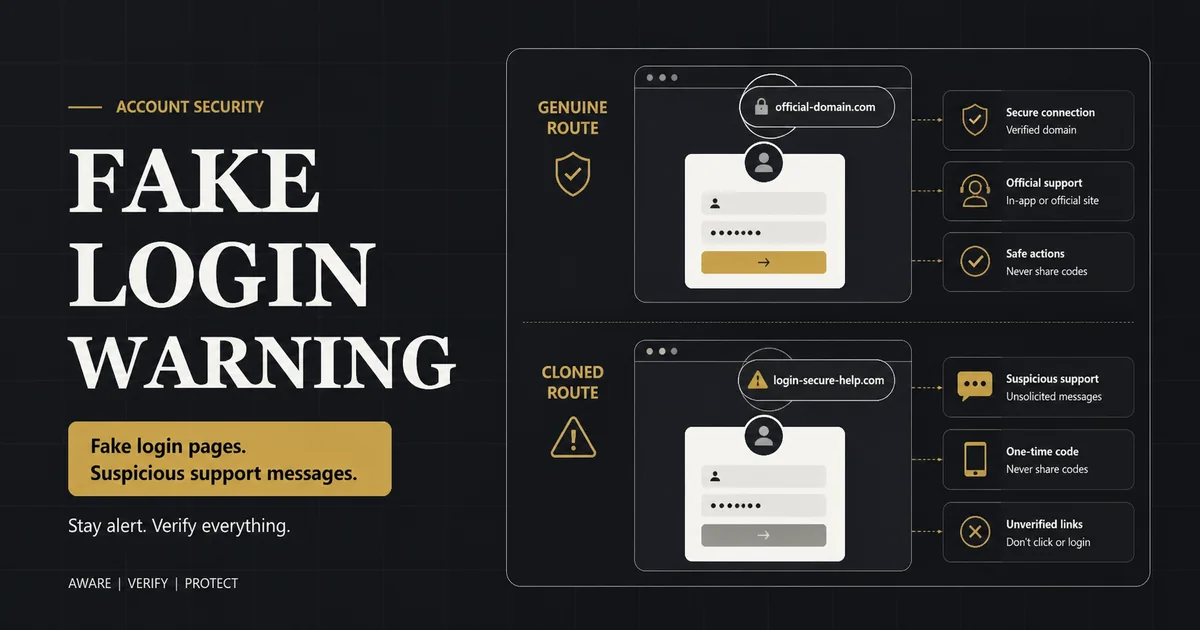
Fake casino pages often imitate a familiar login screen while changing the domain, form destination or support contact. Common warning signs include misspelled addresses, urgent requests for passwords or one-time codes, unexpected software downloads, payment instructions sent only through chat and messages that discourage users from checking the main website.
This security article supports the Account Security page with a focused phishing checklist. It does not identify every genuine or fraudulent site by appearance alone. Users can compare the contextual official Winbox Malaysia reference while independently verifying any destination before entering credentials.
Quick Answer
- Read the full domain from right to left before logging in.
- Use a bookmark or typed address instead of a message link.
- Never share a password, PIN, recovery code or one-time code.
- Treat urgent payment or remote-access requests as a warning.
- Check support contacts through the site you opened independently.
- Change credentials promptly if they were entered on a suspicious page.
Check the Domain, Not Just the Logo
A copied logo, colour palette and login form can be reproduced easily. The browser address is more informative. Look for inserted words, swapped letters, unusual hyphens, misleading subdomains and a different top-level domain. Read the registrable domain immediately before the first single slash.
HTTPS encrypts a connection but does not prove that the operator is genuine. A deceptive site can also obtain a certificate. Use a known bookmark or navigate from the information site’s registration page when checking the intended route.
Subdomain example
In a structure such as login.example.com, the controlling domain is example.com. A longer address containing a familiar name before another domain can still belong to the other domain.
Recognize Credential and Code Theft
A normal login form may request a username and password, but support staff should not ask a user to send the password in chat. One-time codes and recovery codes are designed to prove control; sharing them can let another person approve access.
Unexpected verification prompts after following a message link are a reason to stop. Close the page, open the known site independently and check account activity. Do not approve a login notification you did not initiate.
Password reuse increases damage
If the same password protects email or another service, one fake form can expose multiple accounts. Use a unique password and a password manager where appropriate.
Support Message Warning Signs
Impersonated support messages often create urgency: an account will close, a prize will expire or a payment must be sent immediately. They may request a screen-sharing app, remote access, a transfer to a personal account or communication outside documented channels.
Verify support by opening the intended site yourself and using the listed help route. Do not rely on the contact details inside the suspicious message. Save the sender, time and link for reporting, but do not continue the conversation.
What to Do After a Suspicious Login
If credentials were entered, change the password through the verified site immediately and change any other account that reused it. Secure the connected email or mobile account, review active sessions and payment history, and enable additional authentication where available.
Contact verified support with the time and affected username, but never send the old or new password. If payment details were exposed, contact the bank or wallet provider using its official app or published number.
Create a Repeatable Safe Route
Bookmark the correct address after independent verification. Avoid search advertisements and forwarded short links for future login. Keep browser and device software updated, use screen locks and sign out on shared devices.
The site’s Privacy Policy explains its own data scope, while Terms & Conditions distinguishes this information site from third-party services. Read both when deciding what information belongs where.
Practical Reference Table
| Signal | Why it is risky | Safer response |
|---|---|---|
| Misspelled or extended domain | Can imitate a familiar brand | Close it and use a verified bookmark |
| Request for one-time code | Can approve unauthorized access | Never share; review account activity |
| Urgent payment instruction | Pressure reduces verification | Check through independent support |
| Remote-access software | Gives another person device control | Do not install; end contact |
| Personal payment account | May bypass documented payment flow | Use only the current in-account route |
Step-by-Step Checklist
-
Stop interacting
Do not submit more data or download files.
-
Record the address
Capture the URL and message details for reporting.
-
Open the known site independently
Use a bookmark or manually verified route.
-
Change exposed credentials
Start with email and any reused password.
-
Review sessions and transactions
Sign out unknown devices and note discrepancies.
-
Contact verified providers
Use official platform, bank or wallet channels.
Frequently Asked Questions
Does HTTPS mean a casino page is genuine?
No. HTTPS encrypts the connection, but deceptive sites can also use certificates. Verify the domain and route.
Will support ever need my password?
Legitimate support should not need you to disclose the password. Never share passwords, PINs or one-time codes.
What is a cloned login page?
It is a copied interface hosted at another address to capture credentials or direct users into an unsafe action.
What should I do if I clicked but entered nothing?
Close the page, avoid downloads, and open the known site independently. Monitor for unexpected prompts.
What if I entered my password?
Change it immediately through the verified route, secure connected accounts and review active sessions.
How can I verify a support message?
Ignore contact details inside the message and use the help route published on the site you opened independently.
Conclusion
Visual familiarity is not proof of identity. A safe login habit combines domain checking, independent navigation, unique credentials and refusal to share verification codes. Act quickly if a suspicious page receives any information.
Continue Your Research
Use the site’s focused landing page and related guides to verify current information before making a decision.